LinkedIn Content Strategy for Busy Founders
What Ken Parkinson’s Copilot post shows about making expert content practical, reading the response and giving interested readers a useful next step.
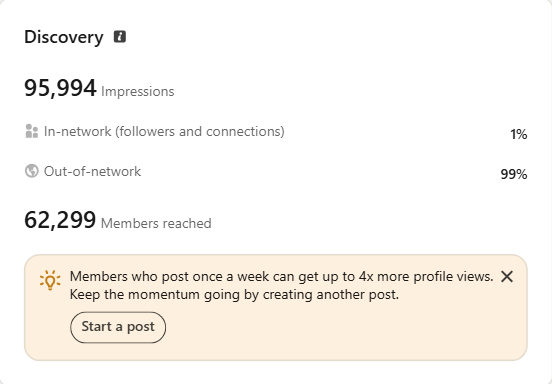
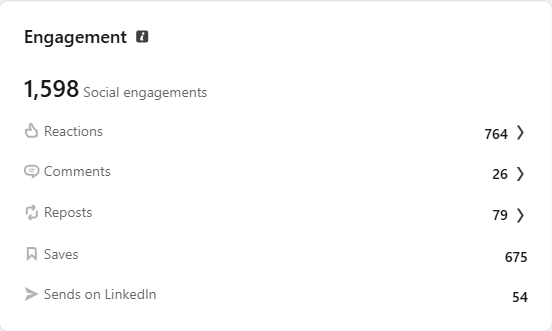
Retained owner analytics for this post. The project record dates the capture to August 10, 2026. These are attention and sharing measures. See Ken’s full case →
On this page
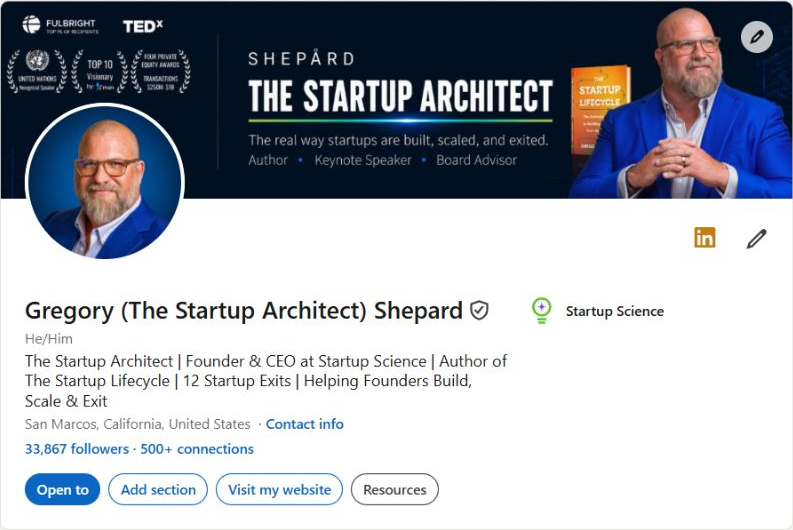
Ken Parkinson’s work centres on AI and workforce transformation. In my executive positioning and content work with him, I refreshed his profile and helped develop that focus into a weekly content series.
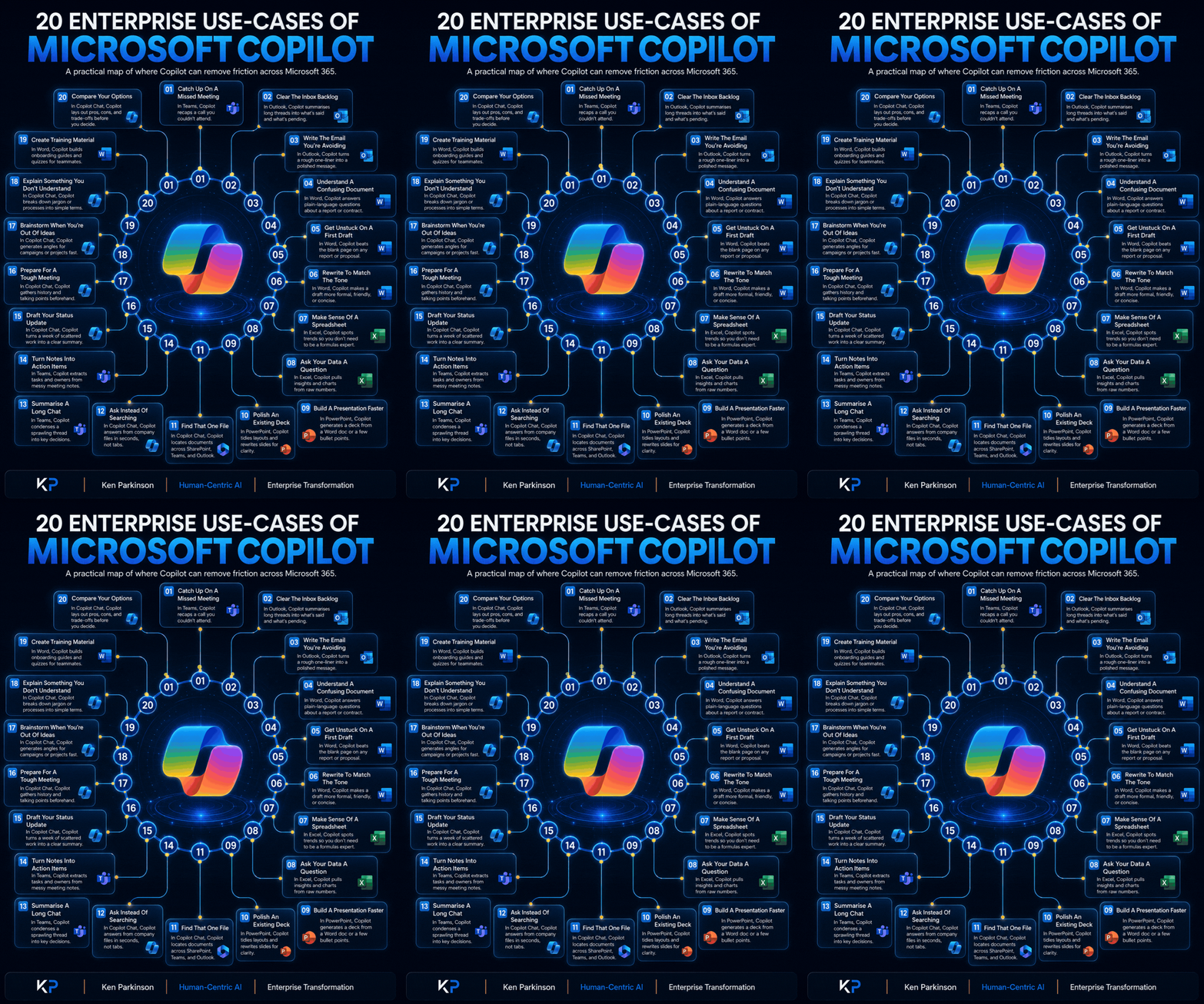
The Microsoft Copilot post above makes the subject concrete through twenty enterprise use cases. It gives us a useful example of what to select from a broad area of expertise, and what the response can tell us.
Start with work the reader recognises
The visual points to familiar situations: a missed meeting, a long email thread and notes that need to become actions. A reader can recognise the task before thinking about the technology.
That is the editorial choice worth taking from the example. “AI transformation” names a field. A specific work situation gives someone a way to judge whether the idea is useful to their team.
The map also brings related tasks into one reference. The reader can scan it, find a relevant use case and return to it later. A founder’s post can do that kind of useful work without trying to explain the whole business at once.
Before drafting your own post, choose a question your clients actually ask. Explain the situation, the decision and the example that makes your answer easier to assess. Let that determine the format.
One subject can become different pieces of useful content
Ken’s example shows how a broad area of expertise can become a practical reference. The Gregory Shepard editorial case shows another production decision: adapting one subject for different reading situations.
For the New York Innovation Forum newsletter project, I developed editions for LinkedIn, Substack, Startup Grind and Odoo. I worked on the opening, deck, visual explanation and closing invitation, then checked the saved copy and images in each platform. The subject stayed connected; the way into it changed.
The LinkedIn edition asks what startup programs should learn about the founder behind the pitch. Its invitation opens a public discussion. The community-email example asks the reader to reply with the help their company needs. Each gives the reader a next step that fits the channel.
| Input or decision | Worked application from the project |
|---|---|
| Shared subject | What meaningful support looks like for a founder entering a startup program |
| LinkedIn opening | Invite the reader to think about what the founder has learned beyond the pitch |
| Community-email opening | Ask the founder to make the kind of help they need specific |
| Different next steps | A public discussion question for the LinkedIn edition; a direct reply for the email |
| Review | Check the facts, intended audience, copy, links and saved platform presentation |
The record shows four editions prepared and checked. It does not establish hours saved, readership or conversion results. Use the example to plan the editorial work, then record how long your own capture, drafting and review process takes.
For a busy founder, the repeatable part is the decision sequence: choose one useful question, keep the supporting material together, decide what each reader needs and review the finished version. Start with the channels your plan actually needs. A different format earns its place by doing a different job.
Use the response to choose what to investigate
The retained owner analytics for Ken’s featured post recorded 95,994 impressions, 675 saves and 54 sends on LinkedIn. The original screens and capture information are above and in Ken’s full case.
Those measures show attention, saving and sharing. They do not establish qualified inquiries or sales.
When reviewing a post like this, I would look at the questions from relevant readers before choosing a follow-up. Which use case needs explaining? What decision are people struggling with? That gives the next post a more specific job than repeating the broad topic because it attracted attention.
Keep those observations alongside any suitable inquiries. The useful question is whether the content is reaching people whose problems fit the work you take on, as well as whether they save it.
Give an interested reader somewhere useful to go
A visitor who follows the post to your profile should find a clear explanation of your work and a relevant example to inspect. The service page can then explain the engagement in more detail.
Ken’s example shows practical content and the recorded response to one post. For the connection across a page, social copy and email, see the separate UCW masterclass campaign. Its actual page copy and original drafts show how each piece can develop the same invitation.
Make the profile, page and first campaign tell the same story.
Useful posts need a clear destination. The Founder Positioning Project connects the profile and offer page to the posts and email introducing that service. We agree the positioning, then I write the LinkedIn profile, one offer page, three posts and one email to introduce it.
You receive editable copy and a publishing sequence, with two consolidated review rounds. Pricing is bespoke; your proposal confirms the fee and delivery schedule. Development, publishing and ongoing management are scoped separately.

Rheanne Razo
Marketing strategist and consultant working on positioning, content, campaigns and marketing delivery for founders and growing teams.
Free profile resources
Get the LinkedIn Profile Checklist
Ten practical checks for a profile that builds trust and turns views into conversations.
No spam. Unsubscribe anytime.